
Dance
A next-generation project management platform for event teams.
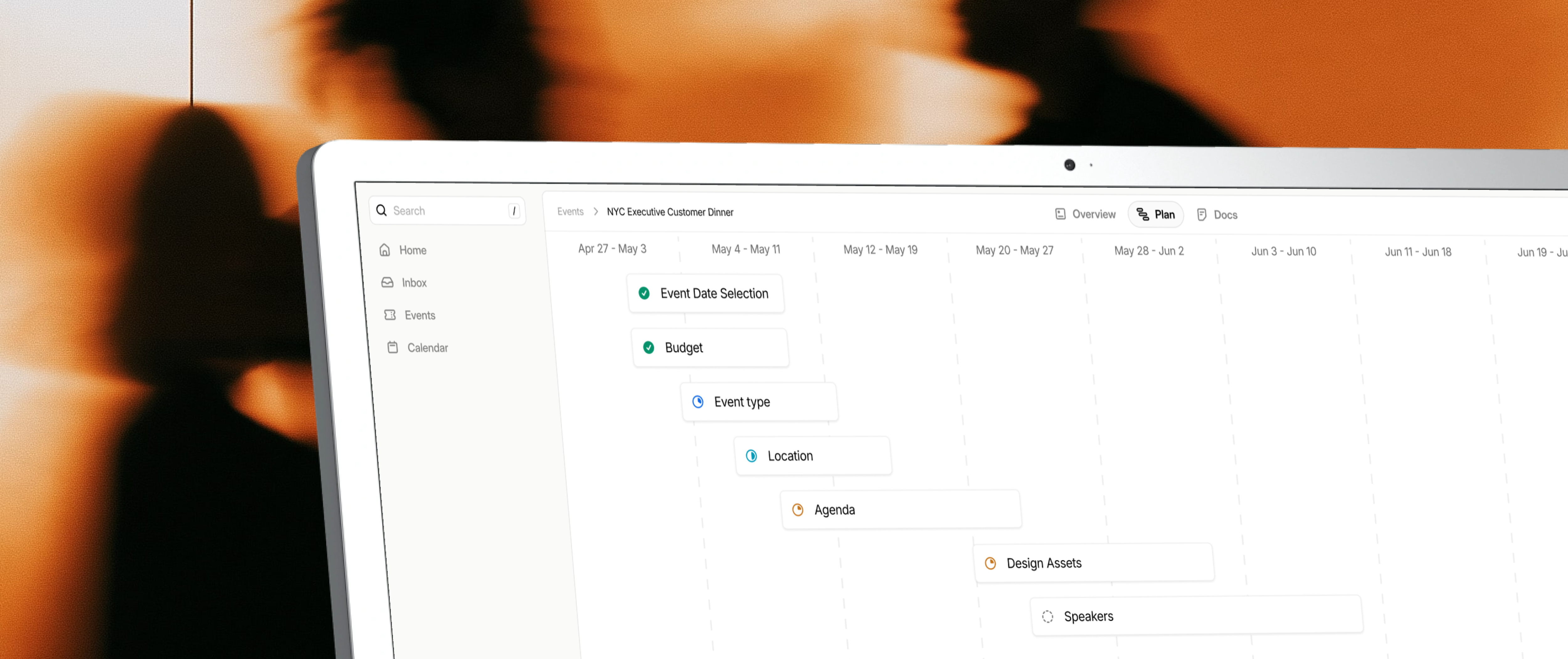
Overview
After speaking with several event planners, I realized just how much of their daily routine feels ripe for modernization; especially given recent advances in AI and autonomous agents. Streamlining team alignment, context-switching, and plan management were obvious places to start.
The initial exploration led to converstations with 10 people who sit at different stages of event planning, from Heads of Events and Heads of Marketing at growing startups to Senior Event Managers at massive companies. These conversations uncovered far more nuanced pain points and started to form a shape in my mind.
Role
I have been collaborating with several people who actively work in the event planning space, but I am the only person defining, designing, building, and pushing this project forward.
Findings
- SMBs are not typically running events. It is usually startups with funding or larger corporations who have the capital to invest in event marketing.
- Customer-facing events have a lot of pressure to be on-brand, and are frequently tied to revenue, so companies typically want to be more hands-on. For this reason, companies will rarely work with event agencies.
- Event teams are typically 1-3 people at startups, but can be closer to 10-15 at larger companies.
- Event teams work in a collection of tools: Slack, Notion, and sometimes a generic project management tool like Monday or Asana.
Problem
Event planning is tedious and disjointed.
A million things have to happen for an event to succeed, even for small events. Planners are juggling context, having several conversations at once, and need to stay aligned with the team and partners.
Working in traditional project management software means better alignment, but it also means added work in workspace hygiene. With updating tasks, tagging people, and canceling tickets, the one million tasks becomes two million tasks.
This all leads to the core mission of making event planning easier.
Design challenges
In an effort to build, essentially, an operating system for a company function, I had to understand how varying people see their work. I had to understand the shape and the map that lives in their heads.
Additionally, I have seen many instances of forced AI solutions that don't actually save people time; so I wanted to identify where it genuinely makes sense to use AI and where it doesn't.
- Product shape: Tailoring a project management tool to specifically be an event-management tool that can actually save event planners time and effort.
- Applying AI: Integrating AI in a way that is helpful and intuitive.
1. Product shape
My outside perspective on what event planning looked like led me to start with an agentic gantt chart. Cursor for project management. This was quickly demystified.
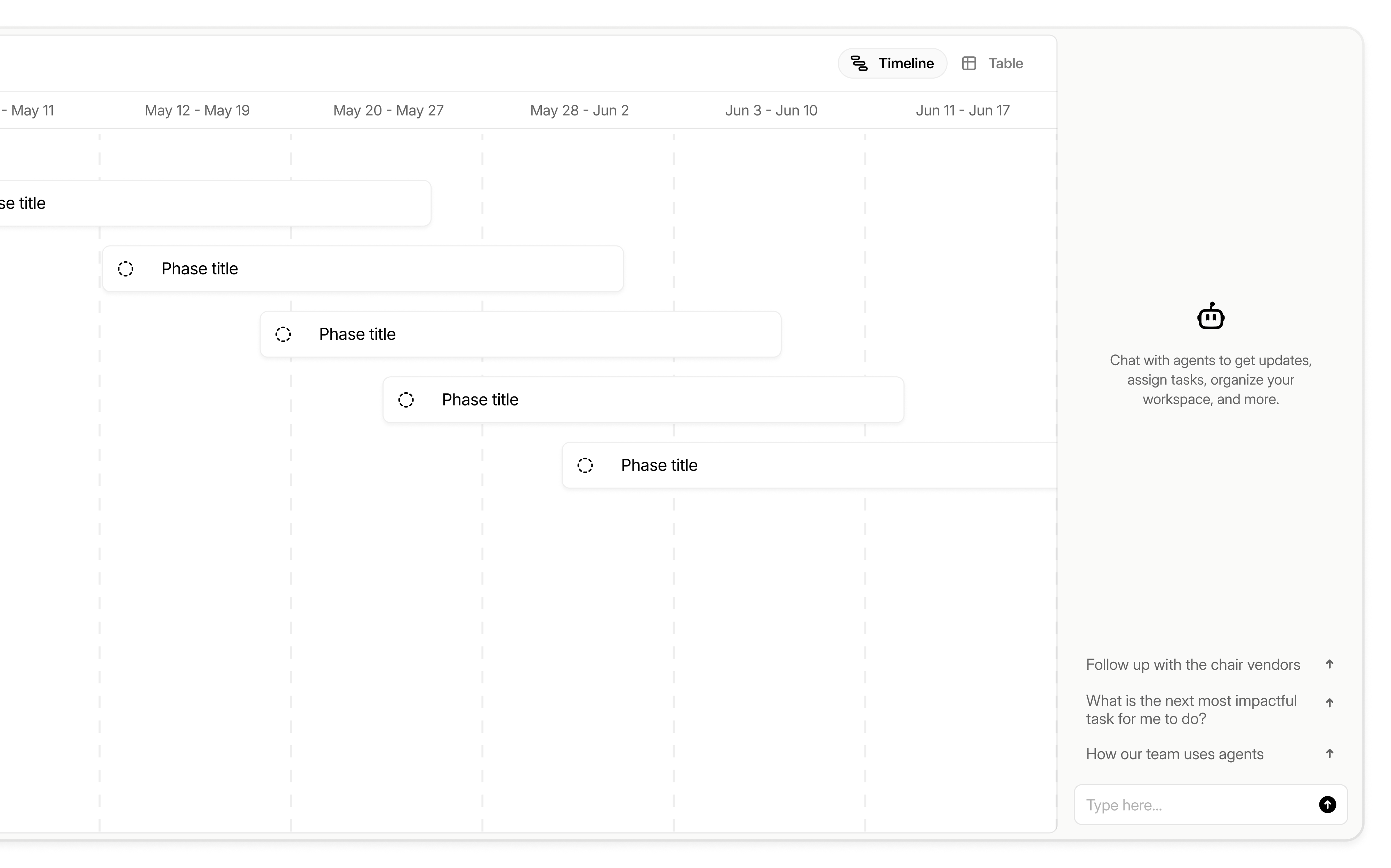
While a timeline for a single event made sense, it was a naive thought on what the whole app would be. My conversations with the subject matter experts I know showed that there would be several events being planned at once, several people owning different parts of the events, and many changes of plan along the way.
It became clear that it wasn't just project management for an event. It was project management across an entire company's function.
There was still a lot I didn't know, and, although a fuzzy form was starting to reveal itself in my head, there were still structural and logical gaps that needed definition.
- What happens when you click into a phase?
- Are phases and tasks 1-to-1?
- What if a phase is just representing a single decision? Does it need a window of time?
- Can there be tasks without phases?
While I did think that a live, dynamic timeline would be helpful, I knew that I was hitting a wall with my own context on the problem. So I talked to people who work on events.
- Jourdan, a Principal Event Manager at Workday, said that her team puts on dozens of events a quarter, and she actually uses pen and paper to organize all the events on a calendar.
- Tessa, a Field Marketing Manager at Dust, said there are a lot of tasks that don't need long periods of time to complete—city selection and other baseline event attributes usually don't require more than a day.
- Tanner, a Brand Designer at Clay, said that he separates the event from the plan. They're connected, but they are not the same.
These insights directly led to product direction.
Event navigation
Seeing how many events Workday runs, and hearing from companies like Profound and Tennr, prompted the question about how someone might navigate through all the events to find the one they are looking for.
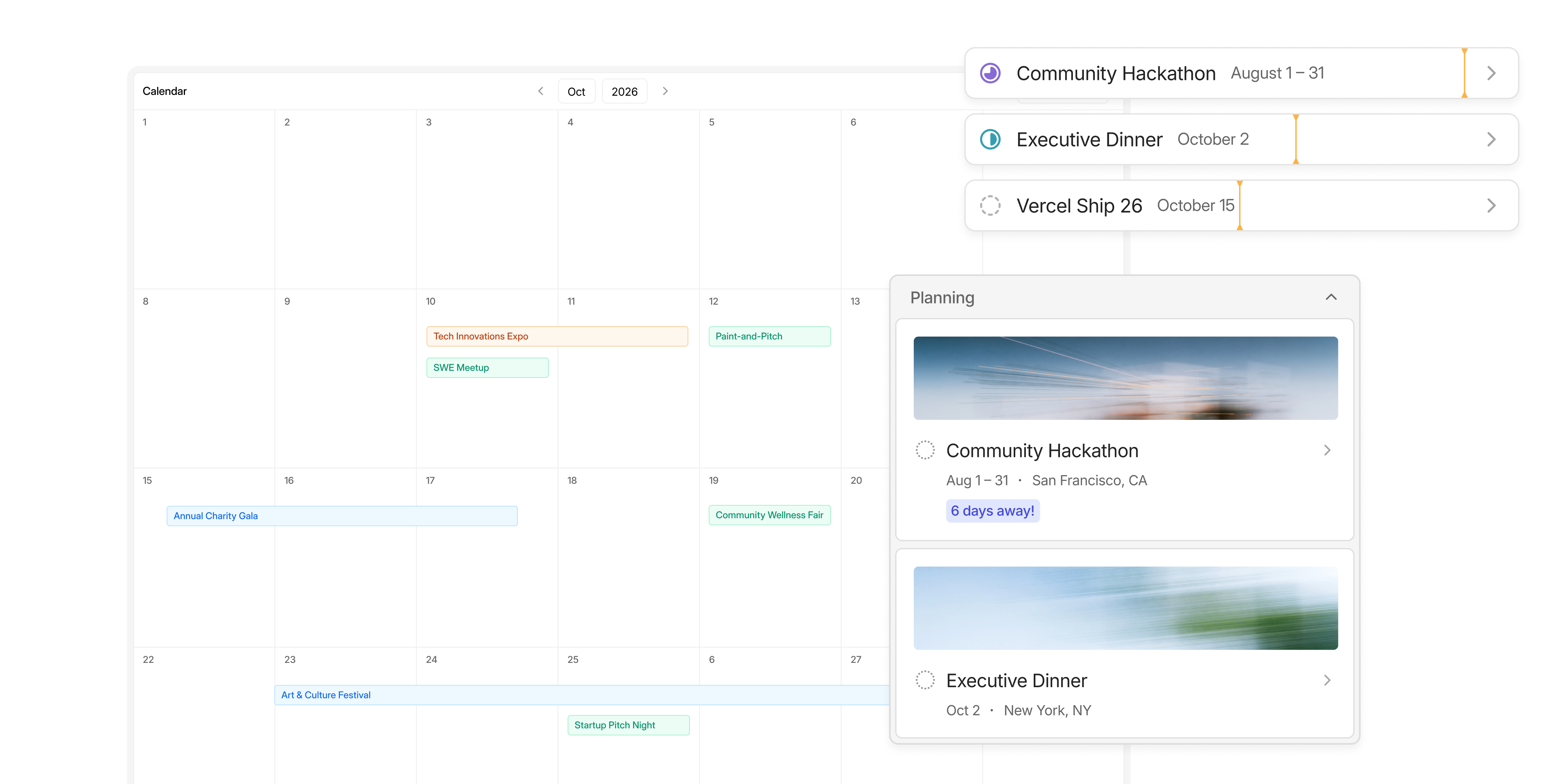
After hearing from different people, it became clear that different humans, even if they are in the same role, think about timelines a bit differently. For this reason, I designed multiple ways to view the collection of events:
- Calendar
- Board
- My Events
While the calendar prioritizes the communication of timing in relation to all events, the board prioritizes the communication of progress of a respective event. Because I had heard multiple preferences, I chose to provide both views rather than forcing a single way of thinking.
The Home page houses a view of events that are relevant to that user. This view's priority is less about the collection of events and more about the individual's accountability. It should be easy for a user to know what they are involved in and what is most urgent.
Event definition
Even though we understand how a user might actually reach an event within the app, we still need to know what we are talking about when we say Event.
It's safe to assume that the word event refers to the day-of agenda. It is also safe to assume that the word refers to the plan, when you're speaking about it from an organizer's perspective. For the purposes of this product, I decided to make the word Event a bit more broad. It is the object that a user/team is defining. It's more than the run of show. It's all of the components that exceed even the minute-by-minute timeline of event day.
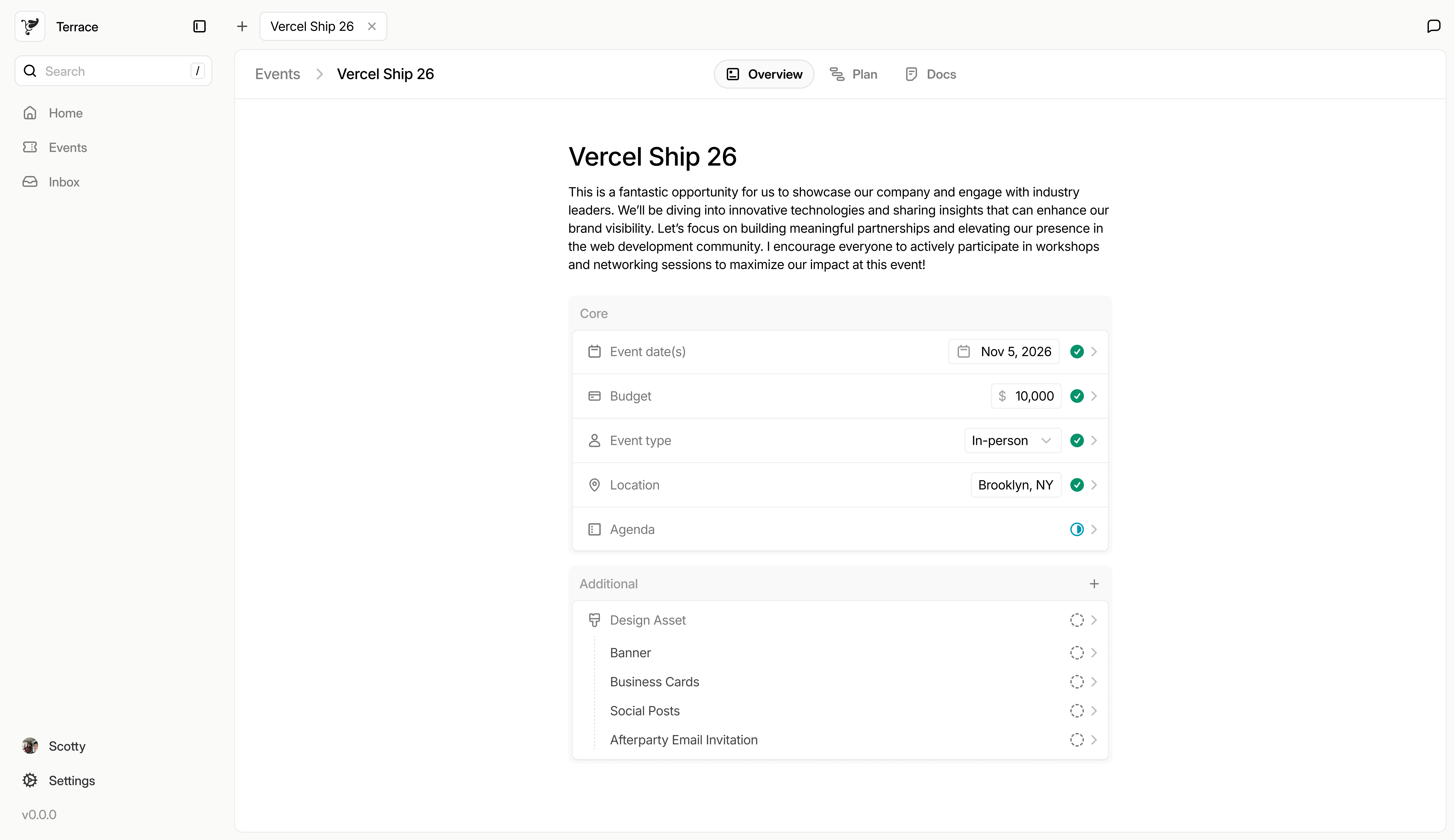
I think of the Event, in the context of Dance, as a collection of properties that need to be decided/fulfilled for the event to run. There needs to be a budget, a location (whether in-person or virtual), a date or date range. Additionally, there are likely optional properties: things that an event might need, but isn't required for all events, like design assets, speakers, music, or a website.
All of these properties lead ot the event definition. It helps the team, the user, and the AI get a high level view of what is needed for any given event. How a user defines those properties was a design challenge in itself.
In a few of the SME conversations, a concept of a node-graph started emerge.
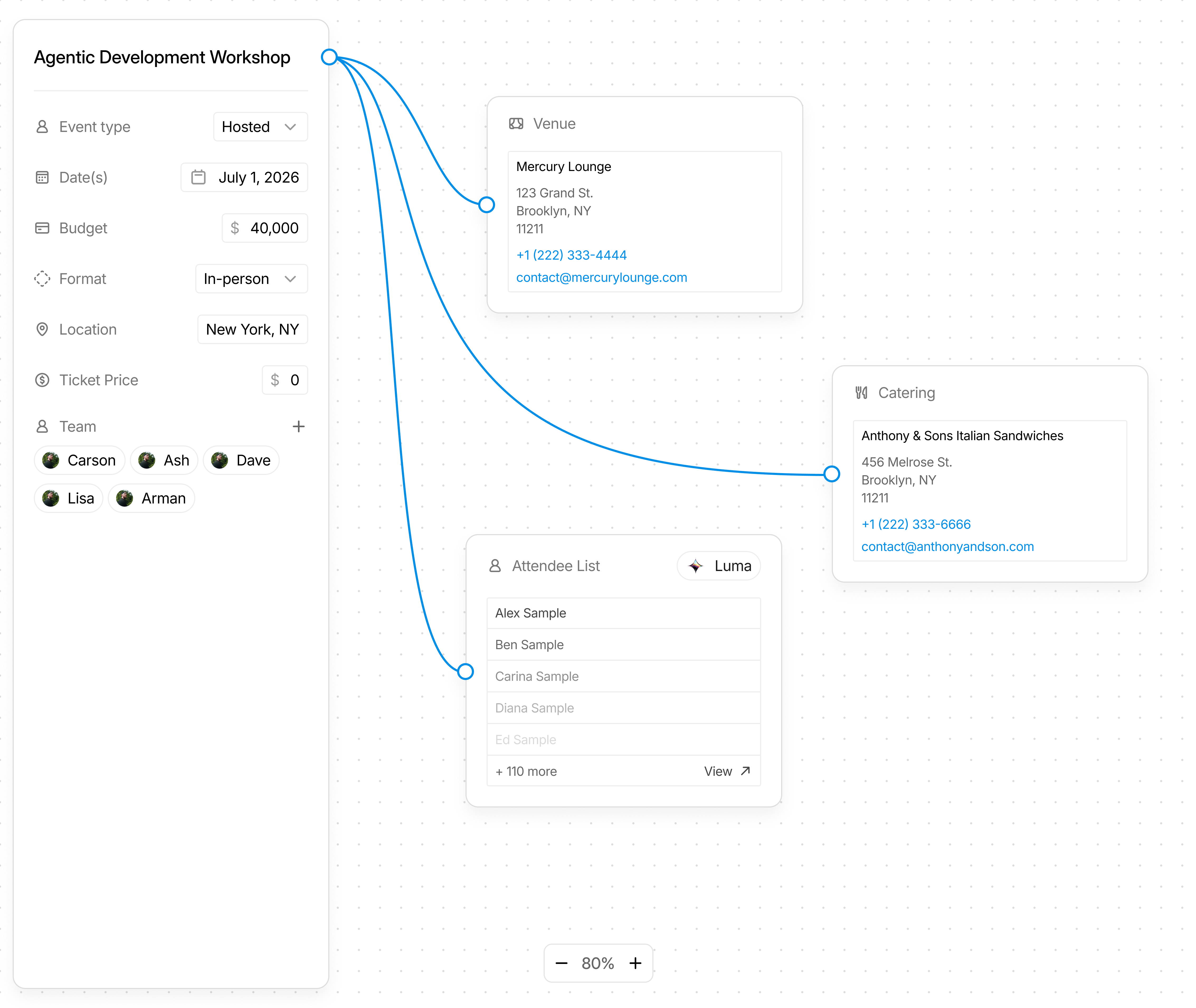
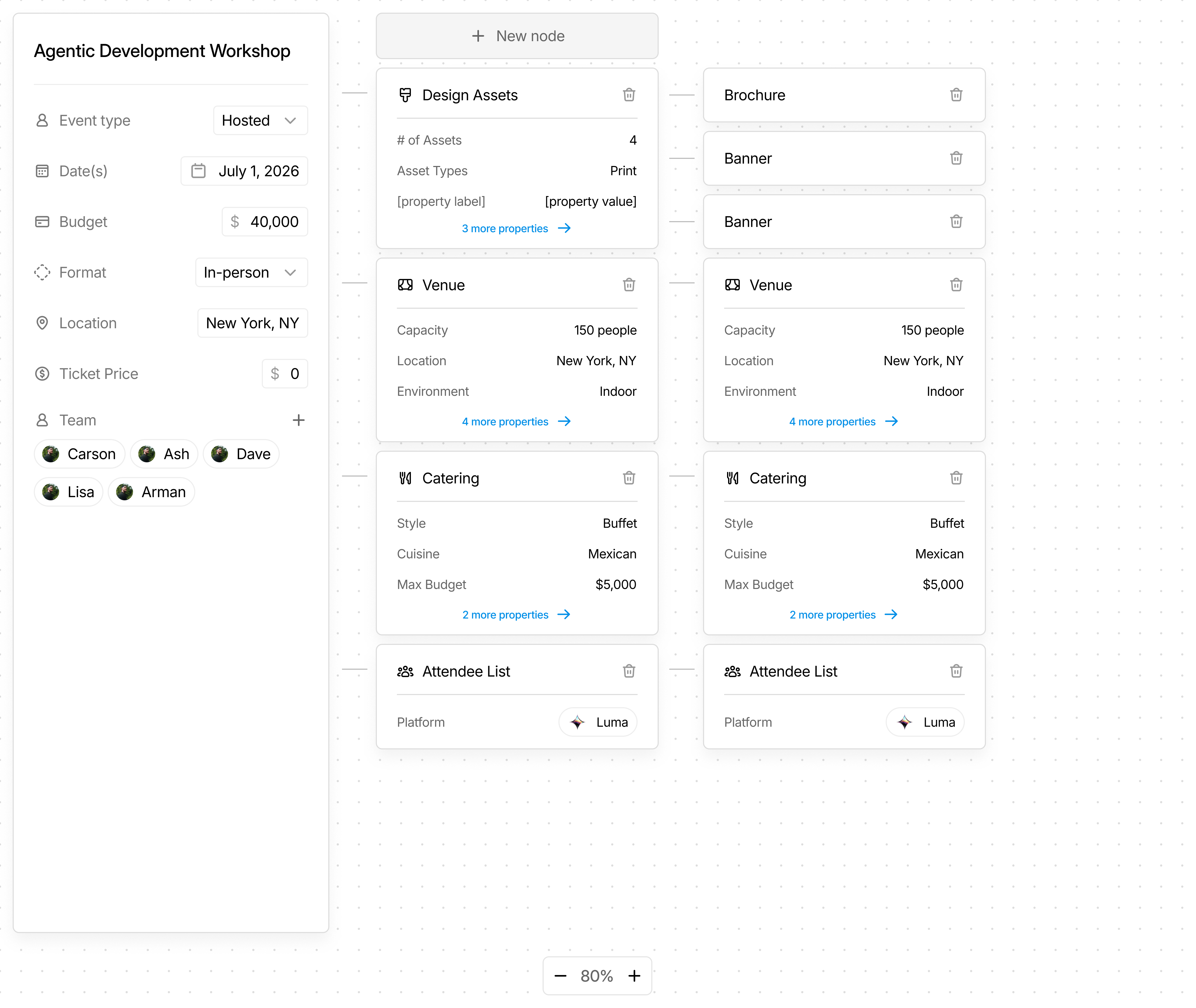
This direction was really interesting and visually compelling, but I worried about scalability. When we get into sub-properties (ex. Design Assets -> Brochure, Banner, Table Cloth, Posters, Handouts, Business cards), I could already see the graph start getting messy.
For the sake of cleanliness, scalability, and ease of understanding, I leaned towards the admittedly safer direction in a list view.
Event Plan
Through multiple conversations with Clay, it became clear that the event definition (what the team is working toward) is different from the event plan (how we get there).
The best way to lay out all the tasks that need to be completed, and when they need to be completed, is a Gantt Chart. A timeline with rows for different Phases, which are groups of tasks, with the ability to see status and click into the Phase detail view.
With clarity on what the event is (the title, the budget, where it is, who on the team is responsible and accountable for it, what assets are needed, etc), it is then possible to build out the order of operations to make it real on the desired dates.
After several attempts at defining the relationship between a Phase and a Task, I landed on a Phase being equivalent to a Parent Ticket.
Initially, I had the Phase detail view as a sidebar with Phase properties and a place to have a conversation with in the context of the phase, but tracking completion of tasks and the situations where a "Phase" is just a single decision made it clear that the table view didn't make much sense.
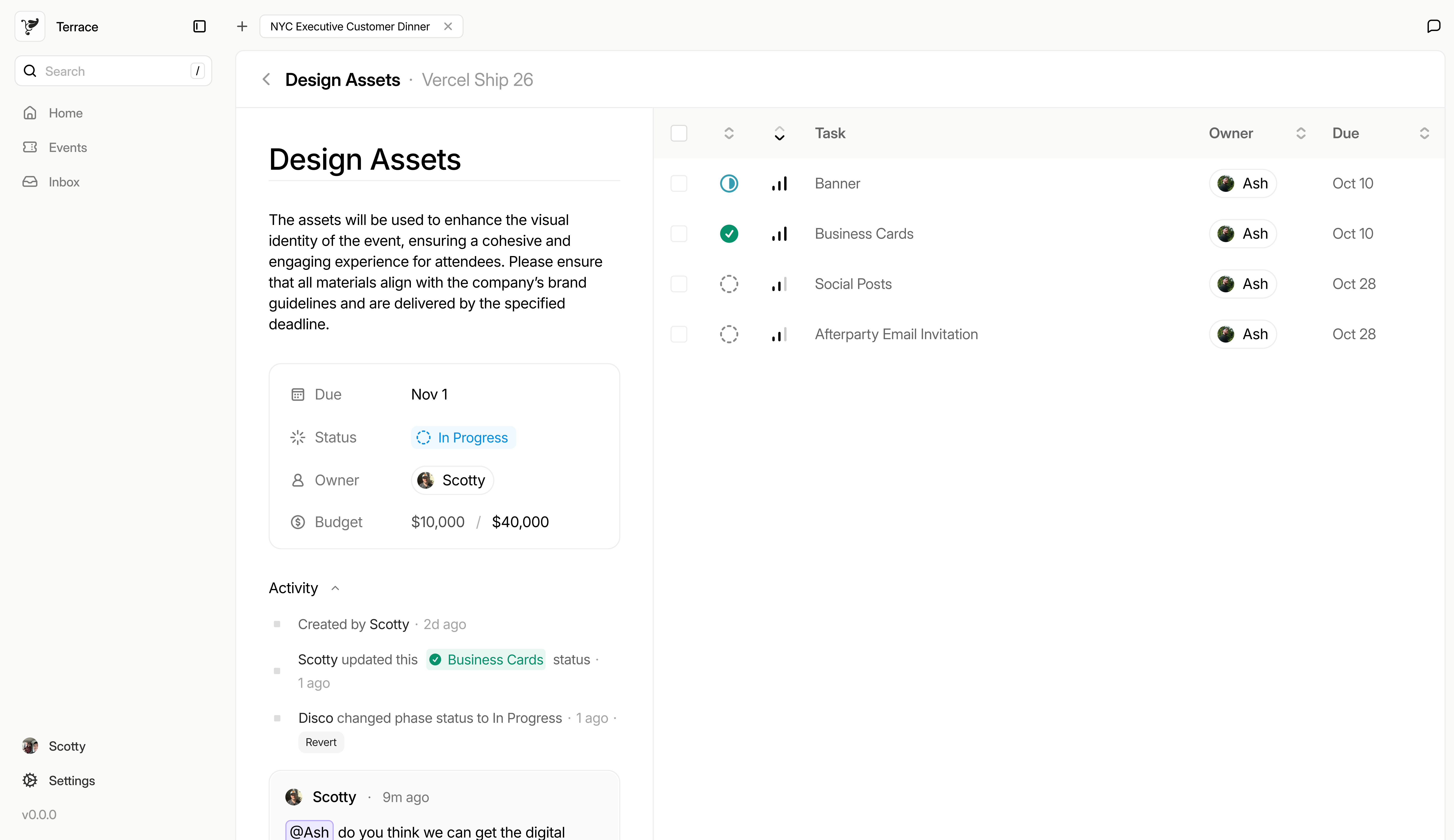
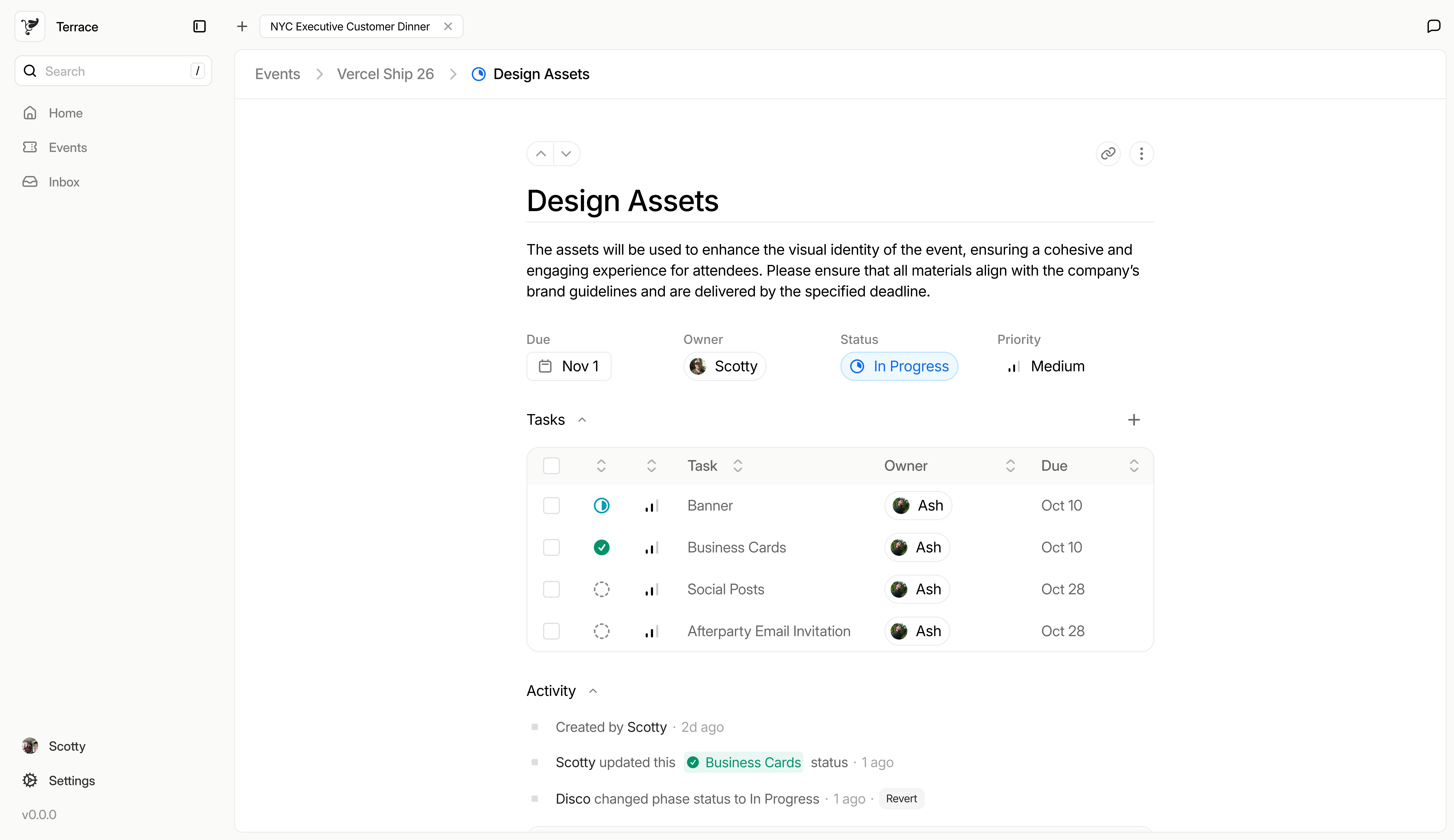
By consolidating page layouts and making the Phase just a task, and sub-tasks live within the phase, the structure of the app started feel a lot leaner. My converstaions with event planners afterward showed that it was a lot easier to follow when they don't have to click through 5 different page layouts.
Ultimately, the product structure has evolved to be relatively lean. The following tree shows the different pathways along with the data model that informs both the UI and the AI.
Product ArchitectureHome - New Event flow - GoTo:Task Detail - GoTo:Event Detail Event Collection - Event Detail - Overview (Property definitions) - Plan - Phase:ID - Task:ID - Docs
Data Model- Events (title, description, properties, docs, plan/gantt) - Properties (= phases: title, description, owner, status, urgency, tasks, conversation) - Tasks (same as properties but no subtasks) - Statuses: todo, in_progress, in_review, completed - Urgency: low, medium, high, urgent - File storage with labels (proposals, writeups, receipts/invoices)
The poduct shape started to show itself as I had my initial conversations. Between designing in figma, showing those same collaborators, and building with Cursor to get a feel of the logic and structure, Dance started to feel like a full product.
There is obviously more to define, but the core logic and architecture is there to finish being built, and then tested.
2. Applying AI
Designing for AI often means building out a chat experience, showing the agent working or thinking, and sequential popovers to let the user select the model speed. The problem is that most of today's AI UI tropes pertain to the chat context. To have an integrated agent experience, I think it needs to break out of the chat.
I think of the agent as a coworker in your workspace, meaning they should be able to do pretty much anything a human user could do. Agents should be able to handle all the workspace hygiene, answer questions, and eventually complete tasks with documentation. Not all actions, though, should require a human typing in a prompt. I think agents will be both reactive and proactive. They will be able to listen to explicit signals as well as implicit signals.
Designing for these signals is where the challenge comes in.
Explicit signals
The AI was asked for a specific thing and triggered to begin its workflow.
Let’s dance
What should we get up to...

 Opus 5.5High Fast

 New EventCreate an agenda PDFCalculate total spend


 Overview
 Plan
 Docs
 Generate Plan
 Event date(s)
 June 1, 2026–June 7, 2026


 Budget
Implicit signals
The AI has a level of ambience that allows it to listen to conversations and in-app actions, and deduce best next steps. It can then use the tools it has to either make the change or offer the change to a human user.
- Internal, reversible changes like a status or urgency update are applied and logged with Revert.


 Business Cardsstatus
- Anything outbound or irreversible, like a vendor email or a deposit, is offered first and waits for a person.
Disco drafted a confirmation email


Hello!
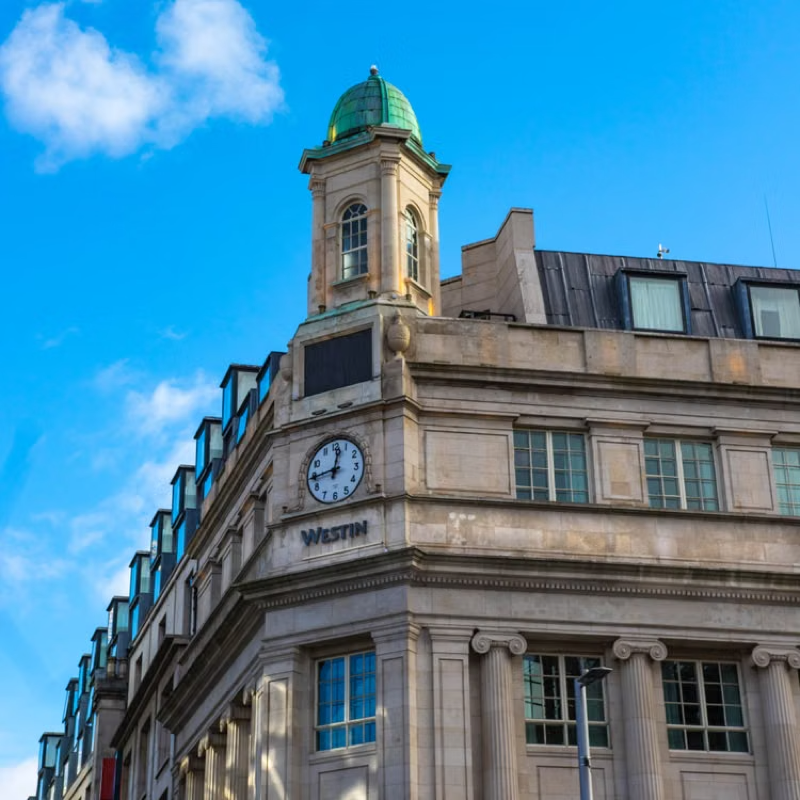
Thank you for sending over the proposal. We would love to have our group stay at the Westin for June 3 – 5th. For a total of 40 people, we would like to confirm that we will need a conference room and catering.
Thank you for your collaboration, and we're excited to stay with you next June.
When we hear "ai-native software" we typically think about MCPs. I think about the tooling built for AI agents, whether internal or external, that allows the agents to take action.
I also think a lot about where we can push this definition. The ambience and proactive nature of AI is becming more and more of a reality with cheaper models that spend less tokens listening to changes in the data. And then I think about where that actually helps a user.
My prime example is the elimination of metawork, and having the app itself dynamically update statuses, urgency, assignment of tasks, etc. All of the clerical work that we currently task Project Managers with should be done by an app that listens, and I believe that will save companies and teams hours of added work.
Feedback
With each iteration, it feels like this product gets closer and closer to serving actual users. All of the changes have been driven by
- trying to uncover shapes and layouts that make sense to the user group, or
- hearing what my collaborators are asking for/telling me is missing.
Dance continues to be refined and questioned, but I am excited about the impact it could have. There are already more feature requests coming in, which include:
- Agendas, whether it's a run of show for a single day event or an week-long offsite agenda.
- Attendee Management, which could be CRM integration, or something like Luma.
- Attendee Communications, like sending out announcements or reminders to people who have RSVP'd.
Build status
I am currently finishing the design system and finishing the MVP build, which is the platform + MCP. This foundational work is an investment to accelerate future stages.
With a fleshed out design system (foundations, components, macro-components, and motion), and a shared language with the coding agents, I can move a lot faster than building on the fly.
After the MVP is up and ready for testing, I will work with my 2 design partners to help them onboard, and I'll implement an easy way for them to provide feedback and submit requests.
Milestones 2 will include addressing the feedback and requests from the design partners and building the internal agent, Disco.